

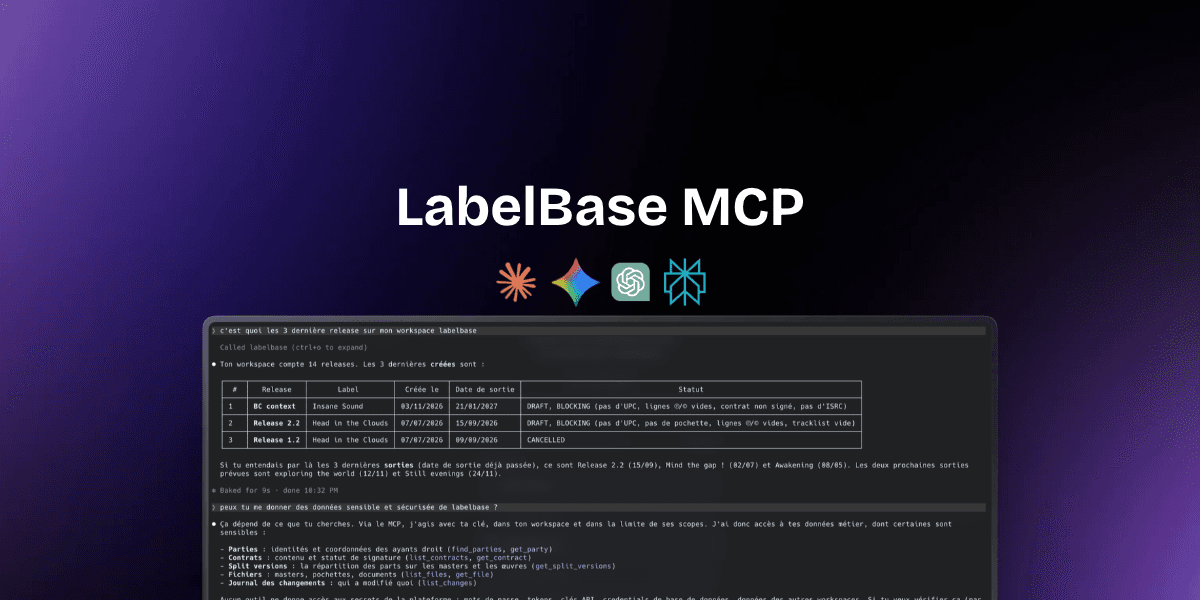
Ask ChatGPT which of your releases are still missing an ISRC and you'll get a polite answer about what an ISRC is. It can't tell you which of yours are missing one, because it has never seen your catalog. Your releases, splits and contracts live in your label software, and your AI assistant lives in a browser tab next to it. Until recently, the only bridge between the two was you, copying and pasting.
MCP removes that step. It's the reason an assistant like Claude can now answer “what's blocking my releases this month?” with your own releases, and then fix what it can. This guide explains what MCP is in plain words, why it matters for a record label, and ten workflows you can set up today, with the tools labels already use: Gmail, Google Drive, Google Sheets, Notion, Slack, Discord, Airtable, n8n, Make and Zapier.
What is MCP?
MCP stands for Model Context Protocol. It's an open standard, published by Anthropic at the end of 2024 and since adopted across the industry, that lets an AI assistant connect to other software in a safe, predictable way.
Think of it as a plug. Software that speaks MCP is called an MCP server: it tells the assistant what it can do, as a list of tools with clear names (“find releases”, “create an artist”, “record a split”). The assistant, called the MCP client, reads that list, picks the right tool for what you asked, and calls it. You write a sentence. The assistant does the clicking.
Three things make this different from pasting a spreadsheet into a chat:
The data is live. The assistant reads your catalog as it is right now, not an export from last Tuesday.
It can act, not just answer. An MCP server can let the assistant create and update things, within limits you set.
It's permissioned. The assistant works as you, with the rights you grant it, and you can cut it off at any time.
Why MCP matters for a record label
A label's week is full of small data tasks that take five clicks each and add up to a day. Checking which releases are ready. Creating a release from an artist's email. Copying credits from a split sheet. Updating the release calendar in Notion. Telling the team in Slack that a single is locked. None of it is hard. All of it is tedious, and most of it is where mistakes creep in: a typo in a legal name, a split that adds up to 95%, a release date changed in one tool and not the other.
An AI assistant is very good at exactly that kind of work, as long as it can see your data. That's what MCP gives it. Concretely, with your label software connected:
You ask in plain words instead of building filters: “singles out in the last 30 days with no Spotify pitch yet”.
You hand over data entry: paste the tracklist and credits, the release gets created with its artists and splits.
You connect your tools through the assistant: it reads an email in Gmail and writes the release in your catalog, or reads your catalog and updates a Notion page.
You build automations that don't break every time someone renames a column in the shared spreadsheet.
MCP vs. an API vs. Zapier: what's the difference?
Labels already automate things, so it's fair to ask what MCP adds. The short version: an API is for developers, Zapier is for fixed recipes, and MCP is for conversations. They work best together.
Copy-paste into ChatGPT. Anyone can do it, and it works for a one-off question on a small export. But the data is stale the moment you export it, the assistant can't act on anything, and it's an easy way to leak a whole catalog into a chat.
Zapier, Make or n8n. Built by whoever runs ops, for the same task every time something happens. Reliable, but every workflow has to be designed in advance.
A public API. For developers, to sync your catalog with your website, your accounting or your own tools. Powerful, but it needs code, or at least an HTTP module.
MCP. For anyone with an AI assistant, and for the questions and tasks nobody planned for. The catch: the assistant can misread a request, so you review what it writes.
In practice, you'll use MCP for everything ad hoc (“create this release”, “what's missing on the EP?”) and your automation tool for the things that should happen on their own every week.
What an AI assistant can do with the LabelBase MCP
LabelBase is a remote MCP server: there's nothing to install, the assistant connects to https://api.labelbase.co/mcp. Here's what it can reach, area by area. Each item maps to real tools the assistant calls, named in brackets so you can recognize them when your assistant shows its work.
Release management: find and read releases (
find_releases,get_release), create them with their tracklist and credited artists (create_release,set_release_credits), change their details and release date (update_release_details), and move their production state (set_production_state).Catalog health: ask what each release or track is still missing before it can go out, such as UPC, ISRC, artwork, master or ℗/© lines (
get_catalog_health).Tracks and works: search tracks, update their ISRC and version title, link them to works and their writers (
find_tracks,update_track_details,create_work,set_work_writer).Royalty splits: read who holds what on a track or a work, on any date, and record a new split version when a deal changes (
get_split_versions,record_split_version). A split is never edited in place: a correction is a new version, so the history stays intact.Artists and rights holders: find or create artists and parties with their IPI, ISNI and PRO (
find_artists,create_artist,find_parties,create_party).Contracts: list the contracts of a release, their status and who still has to sign (
list_contracts,get_contract).Files, distribution and playlists: list a release's masters, artwork and documents, follow each delivery to your distributor, and read your playlists with their share links (
list_files,list_distributions,list_playlists).Everything that changed: the change feed lists every change in your workspace, made in the app, through the API or by LabelBase itself (
list_changes).
What it doesn't do matters as much. It never deletes a track or a file. It never sees a social security or VAT number. It never computes royalty amounts: statements are imported in LabelBase, where its royalty statement import does that work with its own AI and your validation.
10 workflows labels can set up today
The first five run in your assistant, in a conversation. The last five run on their own, in n8n, Make or Zapier, through the LabelBase API. All of them use tools independent labels already pay for.
1. The Monday release check, in Claude
Before the weekly meeting, ask:
Which releases come out in the next four weeks, and what's still missing on each one?
The assistant finds the upcoming releases, reads the catalog health of each one and answers with a table: release, date, label, and the list of what blocks it. No filter to build, no export. Ask a follow-up (“only the ones on Solara Records”, “sort by release date”) and it adjusts. If you keep a release checklist, this is how you check it in thirty seconds.
2. From an artist's email to a release, with Gmail
Most releases start as an email: a tracklist, a few names, “50/50 with the producer on the master”. With both Gmail and LabelBase connected to your assistant:
Read the latest email from hiko about “Give it to me” and create the release on Solara Records with everything in it.
The assistant reads the email, looks for the artist and the producer before creating them (it won't duplicate a namesake), creates the release and its track, credits the artist, and records the master split. Then it lists what's still missing: the UPC, the artwork, the ℗/© lines. You read the summary, and correct anything it got wrong with one more sentence.
3. Split sheets from Google Drive
Signed split sheets often sit as PDFs in a shared Google Drive. Connect Drive, or simply attach the PDF to the conversation, then:
Here's the split sheet for “Paper Boat” in the Tavae folder. Record the publishing split on the work and tell me if anything doesn't add up to 100%.
It reads the document, matches each writer to a party in LabelBase (by IPI when there is one), and records a new split version. If a share is missing, it says so instead of guessing. If you're not sure which split belongs where, our guide to master rights vs. publishing rights is a good refresher.
4. A release calendar in Notion that's never out of date
Plenty of labels plan releases in a Notion database, then forget to update it. With the Notion connector next to LabelBase:
Update the Release Calendar database in Notion with every release scheduled until March, one row per release, with its date, label, artist and what's still missing.
LabelBase stays the source of truth, Notion becomes the view your team likes to look at, and the assistant does the copying you used to skip.
5. A sync pitch, ready in five minutes
A music supervisor asks for “uplifting electronic, around 120 BPM, cleared, by Friday”. Ask your assistant:
Find tracks in our catalog that fit an uplifting electronic brief around 120 BPM, check their master splits are complete, and give me the share link of our existing sync playlist.
It searches your tracks, reads their splits so you only pitch what you can clear, and pulls the playlist link. You still pick the tracks. It just does the digging.
6. Slack alerts when a release moves, with n8n
In n8n, a Schedule trigger every ten minutes, an HTTP Request node calling GET /changes with your last cursor, and a Slack node:
For each change to a release, read the release again.
If its production state moved, post in
#releases: “Arc Pulse is now DONE, out on October 23”.Store the new cursor for the next run.
The change feed's cursor never expires, so if the workflow stops for a week, it picks up exactly where it left off. Nothing is skipped.
7. A Google Sheet for your accountant, with Make
Your accountant doesn't want a login. They want a sheet. In Make, run a monthly scenario that reads your releases and the split versions in effect on the last day of the month, and writes one row per track and rights holder in Google Sheets. Same columns every month, from data nobody retyped.
8. Upcoming releases on your website, with Zapier
If your label site runs on Webflow, WordPress, Squarespace or Shopify, a Zap (or a small script) can read your upcoming releases through the API every morning and publish the ones with a release date and artwork. The “coming soon” page updates itself, and it's never ahead of what your catalog says.
9. A Discord announcement on release day
Labels with a community on Discord can post on release day automatically: a daily workflow finds the releases out today and posts the artwork, the artist and the title in your announcements channel. It's the same idea as the Slack alert, pointed at your fans instead of your team.
10. A catalog backup in Airtable
Some labels like to keep a copy of their catalog in Airtable to build their own views and reports. Follow the change feed from the start once, then keep following it: every release, track and work that changes is read again and updated in your base. It's a mirror you can play with, while LabelBase remains the record.
How to connect your AI assistant to LabelBase
In claude.ai
Open Settings › Connectors and add a custom connector.
Paste
https://api.labelbase.co/mcpas its URL.Sign in to LabelBase, choose the workspace the assistant will act in, and pick what it may read and write.
There's no key to copy. Authorization goes through OAuth, and you can disconnect the app from your LabelBase settings whenever you want: its access stops at once.
In Claude Code and other developer tools
Create an API key in your workspace settings, with only the scopes it needs, then add the server:
claude mcp add --transport http labelbase https://api.labelbase.co/mcp \
  --header "Authorization: Bearer <api_key>"
Any client that supports remote MCP servers over HTTP works the same way.
For automations
n8n, Make and Zapier talk to the REST API with the same key. The API is documented in its reference at api.labelbase.co/api/v1/reference, with guides on authentication, pagination, the change feed and file uploads.
Is it safe to give an AI assistant access to your label?
It's the right question to ask, and the answer depends on how the MCP server is built. Here's what to look for, in LabelBase or anywhere else:
Scopes. You should choose what the assistant can do. A read-only connection to your catalog is a very different thing from write access to your contacts. In LabelBase, contact details (email, phone, address) are a separate scope, never checked by default.
Never more than you. The assistant should act as you, inside one workspace, and never beyond your own rights.
No silent overwrites. If a colleague changed a release after the assistant read it, the assistant's write should be refused rather than erase their work. LabelBase checks every write against the version that was read.
No accidental duplicates. A request retried after a timeout shouldn't create the same release twice.
History. Every change should be traceable. Splits in LabelBase are versions, and every change shows up in the change feed, whoever made it.
One-click revocation. If you stop trusting a connection, you should be able to cut it off instantly.
And one habit on your side: for anything that writes, ask the assistant to tell you what it's about to do before it does it. It takes one extra line in your prompt and catches most misunderstandings.
Prompts to try this week
“List every release with a past release date that's still in DRAFT.”
“Which tracks on Estrela Records have no ISRC yet?”
“Show me the master split of every track on the EP, and flag any that don't add up to 100%.”
“Which contracts for October releases are still waiting for a signature?”
“Create a party for Marchal Hernzt as a person and give them 50% of the master on ‘Give it to me’.”
“Set the release date of ‘Give it to me’ to January 10, 2027, and tell me what's still missing.”
“What changed in the workspace since yesterday?”
FAQ
What does MCP mean in music?
Nothing specific to music: MCP is the Model Context Protocol, the open standard AI assistants use to connect to other software. For a record label, an MCP server is what lets an assistant like Claude read and update your releases, catalog, splits and contracts.
Do I need to code to use MCP?
No. In claude.ai you add LabelBase as a connector by its URL and sign in. Code, or an automation tool like n8n, Make or Zapier, only comes in when you want things to happen on their own.
Can ChatGPT connect to my label software?
Any assistant that supports remote MCP servers can. Support varies by app and by plan, so check your assistant's connector settings. Claude supports custom connectors directly.
Will the AI change my data without asking?
It only does what you ask, within the scopes you granted. If you only grant read access, it can't write anything. For writes, ask it to show you what it's about to change first.
Is MCP a replacement for my label management software?
No, it's a way in. MCP needs somewhere to read from and write to, with your releases, rights and contracts organized properly. That's the job of your label management software. MCP makes it reachable from the assistant you already use.
Where to start
Start small. Connect your assistant with read-only access, and ask it the questions you usually answer by scrolling: what's coming out, what's missing, who still has to sign. When you trust its answers, give it write access and hand over the data entry. Then automate the one thing you do every single week.
You'll find the details, the security model and a live example on the LabelBase API & MCP page, and the AI already built into LabelBase, for statements and music tagging, on AI for record labels.