

Statement season shouldn't cost you a week
If you run an independent label, you know the routine. Every quarter, statements arrive from your distributors. Each one has its own format, its own column names, its own way of spelling your artists' names.
Then the real work starts. You copy lines into a spreadsheet, match them to tracks, apply each artist's split, and check everything twice. By the end, you've lost days, and you're still not fully sure the numbers are right.
That's why we built Labelbase Statements: a simpler way to handle royalty statements for record labels. You import your distributor statements, Labelbase matches them to your catalog, and you know exactly who owes what to whom, and how much.
What is a royalty statement?
A royalty statement is a report that shows how much money a piece of music earned, where it earned it, and who gets paid. Labels deal with two kinds:
Incoming statements come from your distributor. They list streams, downloads and revenue per track, per platform, per country, for a given period.
Outgoing statements are the ones you send to your artists. They show what each artist earned from their releases, after the split defined in their contract.
The job of royalty accounting is to turn the first kind into the second, accurately and on time.
Why music royalty accounting gets messy
The concept is simple. The practice is not. Three problems show up at almost every label.
Every distributor speaks a different language. One sends a CSV with ISRCs, another an Excel file with track titles only, a third uses its own internal IDs. Before you can calculate anything, you have to make these files agree with each other.
Statements don't match your catalog. A track title is misspelled. A remix is listed under the wrong release. A featured artist appears in a different order. Every mismatch is a line you have to fix by hand, or a payment that goes to the wrong person.
Splits live somewhere else. The revenue sits in one file, the contract terms in another, and the formulas that connect them in a spreadsheet only one person understands. When that person is away, statement season stops.
How Labelbase Statements works
Statements builds on something Labelbase already does: manage your catalog. Your releases, tracks, ISRCs, artists and contracts are already in one place. That's what makes the rest possible.
Import your distributor statements. Upload the files you receive, as they are. No reformatting, no copy-paste into a template.
Match every line to your catalog. Labelbase connects each revenue line to the right track, the right release and the right contract.
Apply the splits. The split terms from each contract are applied automatically, so each artist's share is calculated the same way every time.
See who owes what to whom. You get a clear balance per artist and per release: how much came in, how much goes out, and to whom.
Every number stays traceable. If an artist asks where a figure comes from, you can follow it back to the original line in the distributor's statement.
Where AI saves you time
AI in Labelbase Statements is not there to make decisions for you. It's there to take care of the tedious work that eats your evenings during statement season.
In practice, that means less time spent on the lines that don't fit neatly: entries that need to be matched, checked or cleaned up before the numbers can be trusted. You stay in control and validate the result. The repetitive part is handled for you, so hours of reconciliation turn into minutes.
Analytics that go beyond the total
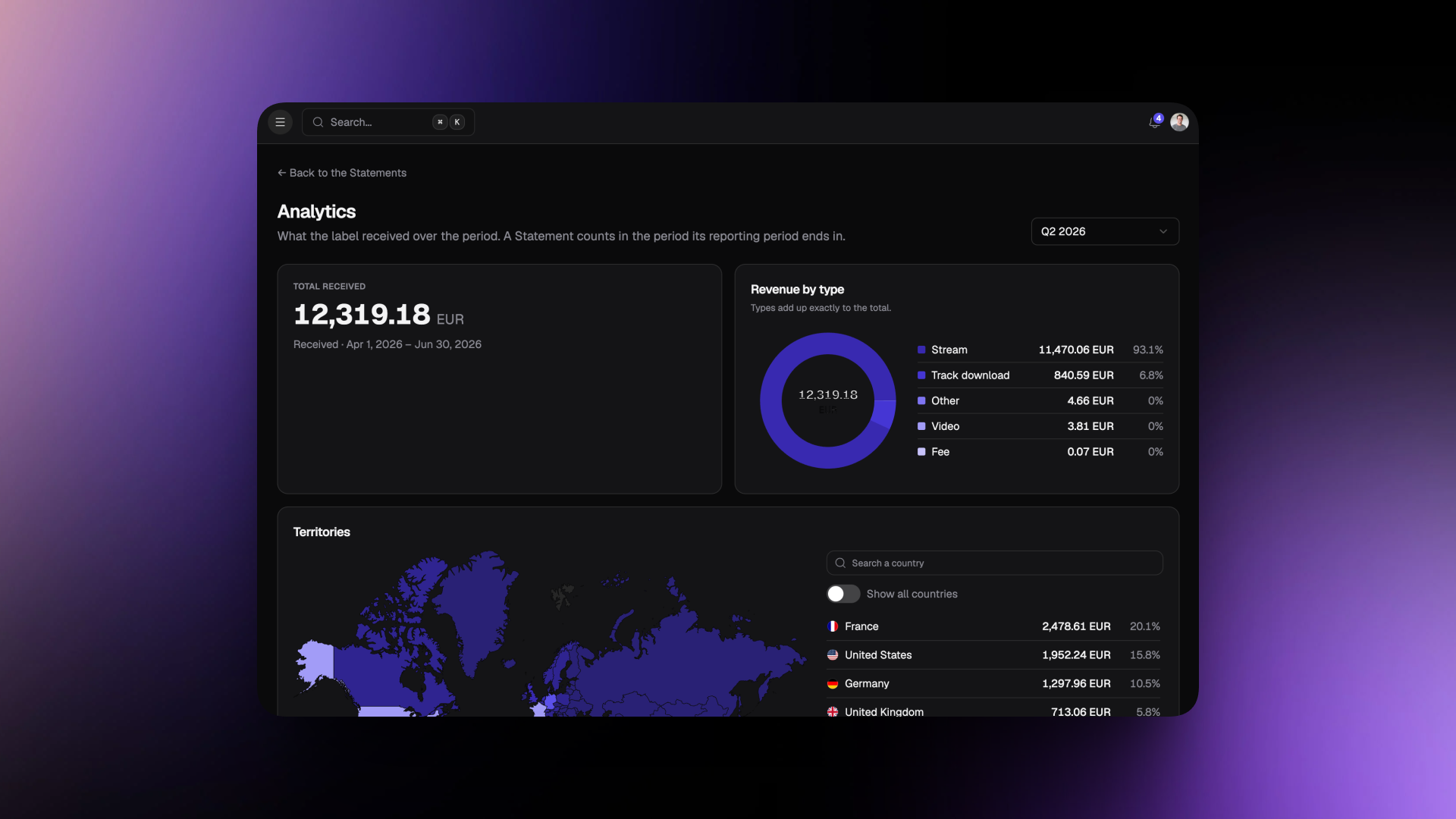
Once your statements are matched to your catalog, they stop being a pile of files and become data you can explore. Labelbase Statements gives you advanced analytics on your revenue, so you can answer questions like:
Which releases and tracks earn the most, and how does that change over time?
Which platforms and countries drive your revenue?
How much does each artist bring in, and how much do they receive?
This helps beyond accounting. It tells you where your catalog performs, which back-catalog titles deserve a push, and how to plan your next releases.
Clear statements build trust with your artists
For an artist, a royalty statement is often the only window into how their music is doing commercially. A confusing statement raises questions. An unexplained number can damage a relationship that took years to build.
With Labelbase Statements, every figure has a clear origin and every split follows the contract. Your artists understand what they earn and why. You spend less time answering emails and more time on what matters: releasing music.
FAQ
Which distributor statements can I import? You import the statements you already receive from your distributors, in their original format.
Do I need to set up my catalog first? Statements works on top of the catalog you manage in Labelbase. The more complete your catalog (tracks, ISRCs, artists, contracts), the more lines are matched automatically.
How are artist royalty splits calculated? Splits come from the contract terms you set for each artist and release in Labelbase. They're applied the same way to every statement.
Can I check where a number comes from? Yes. Every amount can be traced back to the original line in the distributor's statement.
Is Labelbase Statements only for large labels? No. It's built for independent labels that want reliable royalty accounting without hiring an accountant or maintaining complex spreadsheets.
Make statement season the easy part
Royalty accounting doesn't have to mean spreadsheets, late nights and doubts about the numbers. With Labelbase Statements, you import, Labelbase matches and calculates, and you know exactly who owes what to whom.
Ready to try it?
Book a 15-minute demo and see your own statements processed in Labelbase.